
The Big Purchase That Didn’t Deliver
The Perth Panthers had just invested in a digital scoreboard. It was supposed to be the crown jewel of the arena — flashing goals, penalties, and sponsor logos like a Vegas slot machine. Instead, it turned out to be a glorified wall ornament. No lights, no sound, no joy.
The supplier sent out a technician. They gave it a go — checked the wiring, ran diagnostics, probably gave it a good thump for luck. But the thing was beyond saving.
Getting the Return Rolling
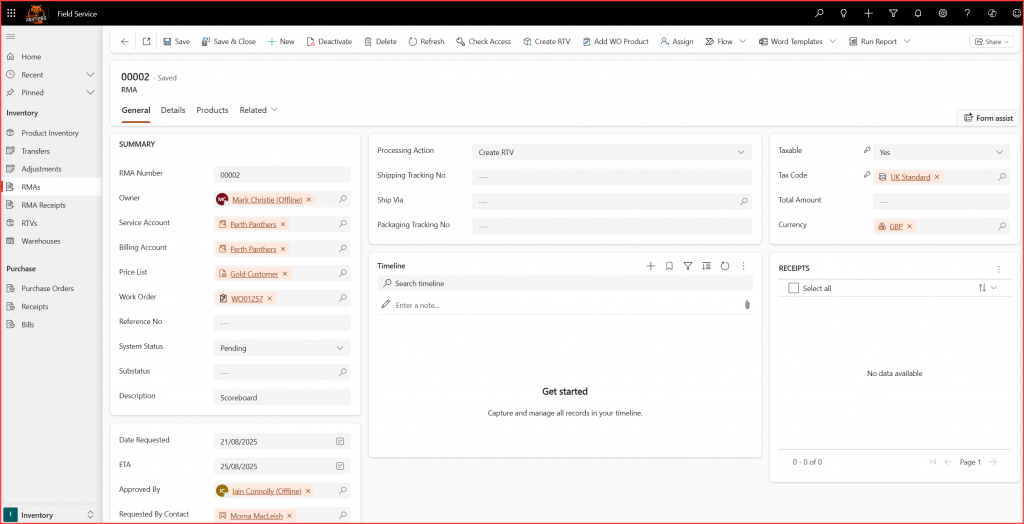
Rather than descending into chaos and finger-pointing, the supplier did the sensible thing: they used Dynamics 365 Field Service to kick off a proper return process. That meant creating a Return Merchandise Authorization (RMA) to log the issue and start the paperwork trail.
What’s an RMA and RTV When It’s at Home?
Now, before we get too deep into acronyms and system clicks, let’s break down what these things actually mean.
RMA stands for Return Merchandise Authorization. In the real world, it’s the digital version of saying, “This thing’s broken, and I’d like to send it back.” It’s a formal way to log the return of a product — not just chucking it in a box and hoping someone notices. You create an RMA to track what’s being returned, why it’s being returned, and what you expect to happen next (repair, refund, replacement, or just a good cry).
RTV stands for Return to Vendor. This kicks in when the product isn’t just going back to your own warehouse — it’s heading all the way back to the original supplier or manufacturer. Think of it as the “you sold me this rubbish, now you deal with it” step. RTV lets you track the journey of the product back to the vendor, including whether they’ve approved the return, received it, and issued a credit or replacement.
So in the Panthers’ case:
- The RMA was used to log the faulty scoreboard and start the return process.
- The RTV was used to send it back to the manufacturer who presumably had some explaining to do.
Logging the Faulty Scoreboard

The supplier linked the RMA to the original work order and set the substatus to something like “Repair Failed – Return Initiated.” They chose “Freight Shipping” as the method of return and saved the record.
Then they added the product manually — one very expensive scoreboard. They ticked the box to credit the Panthers’ account, which is the digital equivalent of saying “Sorry about that, here’s your money back.”
Receiving the Return
Once the Panthers shipped the scoreboard back, the supplier created an RMA receipt. This wasn’t just a formality — it triggered an inventory journal that updated the warehouse stock. The system now knew the scoreboard was back in the building, sulking in a corner.


Sending It Back to the Manufacturer
Since the scoreboard was heading back to the original vendor, the supplier created a Return to Vendor (RTV) record. They tracked its journey through status updates: Approved → Shipped → Received. No guesswork, no chasing emails — just clean, traceable steps.
Making It Right for the Panthers
To make sure the Panthers weren’t left out of pocket, the supplier edited the RMA Product record and set “Credit to Account” to Yes. Then they issued a credit memo through the RMA receipt. That’s how you turn a disaster into a decent recovery.

Why This Wasn’t a Total Disaster
Instead of a messy back-and-forth, the Panthers got a clean, traceable process. They didn’t have to chase anyone, didn’t have to guess what was happening, and most importantly — they got their money back.
This wasn’t just a return. It was a proper field service win.